English

Views: 102 Author: Site Editor Publish Time: 2025-05-12 Origin: Site
Overheating can cripple your electronics, from sluggish performance to complete failure. Without proper cooling, devices like PCs or LEDs suffer. Understanding the difference between active and passive heatsinks helps you choose the right solution to keep your tech running smoothly.
The key difference between active and passive heatsinks lies in their cooling mechanisms. Active heatsinks use powered components like fans to force air movement, enhancing heat dissipation, while passive heatsinks rely on natural convection and radiation to cool devices.
Overheating can cripple your electronics, from sluggish performance to complete failure. Whether you are designing high-performance desktop PCs, LED lighting systems, or industrial telecom equipment, choosing the right thermal management strategy is critical. As thermal engineering experts at KingKa, we often receive questions about the best approach. Understanding the fundamental difference between active and passive heatsinks helps engineers and product designers choose the most reliable solution to keep their technology running optimally.
Passive heatsinks are the silent heroes of low-power electronics, offering effective cooling without any noise or extra power draw.
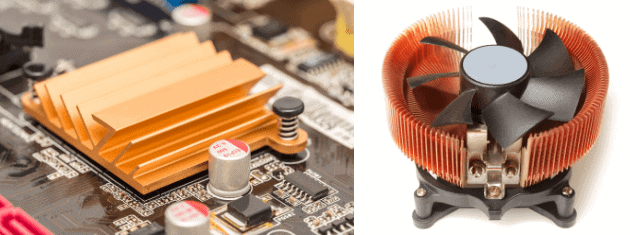
A passive heatsink is a heat dissipation device that operates without any moving parts or external power sources. It works by increasing the surface area in contact with the air, allowing heat to be dissipated through natural convection and radiation.

Passive heatsinks are typically made of metals like aluminum or copper, with fins to maximize surface area. Heat from the component transfers to the heatsink, which then radiates it into the surrounding air. Natural convection—warm air rising and cooler air replacing it—facilitates this process. For example, a low-power Intel Celeron processor in a home server often uses a passive heatsink, relying on case airflow. In LED lighting, passive heatsinks extend bulb life by dissipating heat quietly. Theoretically, their efficiency depends on ambient temperature and airflow. Practically, poor case ventilation can reduce performance.
Table: Examples of Passive Heatsink Applications
This table shows common components that use passive heatsinks and the types of heatsinks typically employed.
Passive heatsinks shine in noise-sensitive environments. They consume no power and require minimal maintenance due to the absence of moving parts, making them highly reliable. For instance, telecom equipment often uses passive heatsinks for consistent, silent operation. However, they are less effective for high-heat components like gaming GPUs, as they rely on ambient conditions. Their larger size can also be a drawback in compact devices. Design-wise, there’s a trade-off between size and cooling capacity.
Pros: Silent, no power use, low maintenance.
Cons: Limited cooling for high-heat devices, larger size.
Passive heatsinks are common in low-power electronics. For example, a Raspberry Pi often uses a small aluminum passive heatsink for its processor, keeping it cool without noise. In LED lighting, passive heatsinks are integrated into bulb designs to manage heat. They’re also used in telecom units and architectural designs where silence is critical. Their simplicity makes them cost-effective, but they require careful placement to ensure adequate airflow.
For high-performance devices, active heatsinks step in, using fans or other mechanisms to tackle intense heat loads.
An active heatsink incorporates a fan or other active cooling mechanisms to enhance heat dissipation. The fan forces air over the heatsink, significantly improving cooling efficiency compared to passive solutions.

Active heatsinks combine a metal base (often aluminum or copper) with a fan to force air across the fins, accelerating heat transfer. For example, a high-end AMD Ryzen CPU in a gaming PC uses an active heatsink with a PWM fan that adjusts speed based on temperature. The fan’s airflow overcomes the limitations of natural convection, making active heatsinks ideal for high-heat scenarios. Theoretically, fan speed and fin design impact efficiency. Practically, dust buildup can reduce performance over time.
Table: Examples of Active Heatsink Applications
This table highlights components that benefit from active heatsinks and the types of heatsinks used.
Active heatsinks excel in cooling high-performance components, such as GPUs in gaming PCs or servers. They can be more compact than passive heatsinks for the same cooling capacity. However, fans generate noise, consume power, and require maintenance due to potential wear. For instance, a friend’s gaming rig became noisy after dust clogged the heatsink fan, requiring cleaning. Design-wise, there’s a balance between cooling power and noise levels.
Pros: High cooling efficiency, compact design.
Cons: Noisy, power-consuming, higher maintenance.
Active heatsinks are found in high-performance electronics, such as gaming PCs, workstations, and servers. For example, an Intel Core i9 processor in a workstation uses an active heatsink to manage intense heat during rendering tasks. Gaming consoles like the PlayStation 5 also rely on active cooling. Their ability to handle high thermal loads makes them essential for overclocked systems or data centers.
Choosing between active and passive heatsinks depends on your specific needs. Let’s break it down.
Active heatsinks offer better cooling but are noisier and consume more power, while passive heatsinks are silent and power-free but less effective for high-heat applications.
Here’s a clear comparison of active and passive heatsinks based on key factors:
Table: Comparison of Active and Passive Heatsinks
Active cooling solutions use mechanical components like fans or pumps to force airflow and maximize heat dissipation, making them ideal for high-TDP CPUs in desktop PCs. In contrast, passive cooling relies entirely on natural convection and high-surface-area heatsinks (with no moving parts), offering completely silent operation and zero maintenance.
Here is a detailed thermal engineering comparison to help you maintain optimal temperatures:
| Feature | Passive Heatsinks (Natural Convection) | Active Heatsinks (Forced Convection) |
| Cooling Mechanism | Relies on natural airflow & high surface area | Uses fans/pumps to force air/liquid movement |
| Heat Dissipation Efficiency | Moderate (Best for low to medium TDP) | Very High (Handles extreme thermal loads) |
| Reliability & Lifespan | Extremely High (No moving parts to fail) | Moderate (Fans can degrade or accumulate dust) |
| Noise Level | 100% Silent | Noticeable noise (Depending on fan RPM) |
| Space Requirement | Requires larger footprint (Taller fins) | More compact for the same cooling capacity |
The choice between active and passive heat sinks depends primarily on system power density, thermal design power (TDP), and operational constraints.
For low-power or noise-sensitive applications such as telecom equipment, LED systems, or embedded electronics, passive heat sinks are generally preferred due to their silent operation and high reliability.
For high-performance systems such as gaming PCs, servers, power electronics, and AI computing devices, active heat sinks are necessary to handle high heat flux and maintain stable performance under sustained loads.
In industrial thermal design, hybrid cooling strategies combining passive heat spreading with active airflow are often used to achieve optimal balance between performance, reliability, and acoustic requirements.
Passive heatsinks are ideal for low-power devices or noise-sensitive environments, like home servers or audio equipment. For example, a media PC in a living room benefits from a passive heatsink’s silence. Active heatsinks are better for high-performance systems, such as gaming PCs or overclocked CPUs, where heat dissipation is critical. A friend upgraded his PC with an active heatsink to support overclocking, significantly improving performance. Design-wise, active heatsinks allow for smaller form factors, but passive ones are more reliable long-term.
Selecting the right heatsink can be tricky, but considering a few key factors can make the process easier.
To choose the right heatsink, consider your device’s heat dissipation needs, noise tolerance, power availability, and budget.
Evaluate your device’s thermal design power (TDP), which indicates heat output. Low-TDP devices (e.g., Raspberry Pi) can use passive heatsinks, while high-TDP components (e.g., AMD Ryzen 9) need active ones. Noise tolerance matters in quiet settings like offices. Power availability is crucial for battery-powered devices, favoring passive heatsinks. Budget also plays a role—passive heatsinks are cheaper but may require larger sizes. For example, a compact gaming laptop needs an active heatsink due to space constraints.
Table: Heatsink Suitability Based on Factors
This table helps you assess which heatsink type is more suitable based on specific factors like TDP, noise sensitivity, and budget.
Proper installation ensures optimal performance. Apply thermal paste between the component and heatsink to improve heat transfer. For active heatsinks, ensure the fan is securely mounted and connected to power. Maintain passive heatsinks by keeping them dust-free, and clean active heatsink fans every 6 months to prevent clogging. I learned this the hard way when my PC overheated due to a dusty fan. Ensure good case airflow for both types to maximize efficiency.
Steps for Installation:
Apply thermal paste evenly.
Secure heatsink with screws or clips.
For active heatsinks, connect fan to power.
While active and passive heat sinks are suitable for standard electronic applications, industrial systems often require customized thermal designs to meet higher power densities and reliability requirements.
At Kingka, we design and manufacture both passive and active cooling solutions using extrusion, skived fin, and cold forging technologies, enabling optimized thermal performance for demanding applications in electronics, power systems, and industrial equipment.
If you are developing a thermal system for high-power or space-constrained applications, our engineering team can provide design support and manufacturability analysis.